
Get Your Quote for Access Event Reporting Setup
Fill the form below to inquire about Electrical Services Ontario's Access Event Reporting Setup in Barrie.
Call Electrical Services Ontario at (289) 672-2825 for Access Event Reporting Setup in Barrie and turn the logs into answers.
Fill the form below to inquire about Electrical Services Ontario's Access Event Reporting Setup in Barrie.

With 15 years of configuring access platforms, our technicians build Access Event Reporting Setup Barrie that turns raw door activity into reports a business can actually search, filter, and hand to an auditor without a second thought.
Most access control systems across Barrie technically log every entry and exit, but a raw activity feed is not the same thing as a usable report. Configuring the reporting layer properly is what separates a system where pulling an incident report takes five minutes from one where it takes an afternoon of scrolling through unfiltered data. That difference matters most on exactly the day it matters least to be figuring it out for the first time.
Access Event Reporting Setup Barrie means configuring which events get logged, how long they are retained, who can access reports, and how the data can be filtered and exported once it exists. Out-of-the-box defaults on most platforms log everything but organize almost nothing, leaving administrators to build their own filters from scratch every single time they need a specific answer to a specific question.
Our technicians configure report templates during setup so common questions, such as who entered a specific door on a specific date, can be answered in a few clicks rather than a manual data export throughout Barrie. This upfront configuration work is what makes the difference between a system that produces data and one that actually produces answers when someone actually needs them.
Logging every single event on every door sounds thorough but often makes reports harder to use for teams throughout Barrie, since a report cluttered with routine entries buries the events that actually matter during an investigation. Event filtering rules configured during setup let a business separate genuinely significant events, like after-hours entries or forced door alarms, from routine daily traffic that rarely needs review.
Businesses throughout Barrie that skip this filtering step during setup often discover the gap only when they need a specific answer quickly, such as during an incident investigation. They find the report tools were never actually configured to make that answer easy to find without a lengthy manual search through unfiltered data.
Access Event Reporting Setup typically costs between $300 and $1,200 per site depending on the complexity of event filtering rules, the number of custom report templates needed, and whether integration with other security systems is included. Contact Electrical Services Ontario for a quote specific to your building.
Most platforms do log every entry and exit by default, but a raw activity feed is not the same as a usable report. Without proper configuration, pulling a specific answer, such as who entered a door on a given date, can take an afternoon of manual scrolling instead of a few clicks.
Retention needs vary by industry and compliance requirements, with regulated sectors like healthcare and finance often facing specific minimum retention periods. We configure retention based on what a business actually needs to keep, since defaulting to a platform's minimum setting can leave a gap exactly when historical records matter most.
A standard single-site reporting configuration typically takes 1 to 3 days, covering event filtering rules, retention settings, report templates, and role-based access permissions. Properties with complex compliance requirements or multiple integrated systems can extend to a week or more.
Yes. Role-based reporting permissions can be configured so a front desk employee sees only what they need, such as whether a specific visitor arrived, while a security director retains access to full monthly incident trends. This is set up during the initial configuration rather than left as a single broad permission level.
In most cases, yes, where the underlying platforms support it. Integrating access, video, and alarm data into one unified timeline eliminates the need to manually correlate separate logs after an incident, and Electrical Services Ontario configures these integrations as part of the setup wherever compatible.
The three most common gaps are retention periods left at the manufacturer's default rather than matched to compliance needs, no saved templates for frequently asked questions, and alert thresholds nobody has adjusted since installation. None of these are visible until someone needs a fast, specific answer.
How long access event data needs to stay retrievable depends heavily on the industry and any specific compliance obligations a business carries, and this data retention setting is easy to overlook until an audit or insurance claim requires records the system never kept. Properties across Barrie in regulated sectors, including healthcare, finance, and government contracting, often face specific minimum retention periods written into their compliance requirements.
We configure retention settings for properties in Barrie during setup based on what a business actually needs to keep, since defaulting to the platform's minimum retention period can leave a gap exactly when historical records matter most. Setting retention too short is a silent risk that stays invisible until the exact moment records are needed and turn out to be gone.
Most businesses end up asking the same handful of questions repeatedly: who entered this door today, what happened during a specific time window, and which credentials accessed a restricted area this month. Building saved report templates for these recurring questions during setup means an administrator clicks one button instead of manually configuring filters every time throughout Barrie.
We work with each client throughout Barrie to identify their actual recurring reporting needs before configuring templates, rather than applying a generic template set that may not match how that specific business actually uses its reports. A property management company checking daily access logs needs different saved templates than a retail chain investigating loss prevention incidents, and neither would be well served by a one-size-fits-all default report configuration.
Reports that only get pulled after something goes wrong miss the chance to catch a developing problem in real time for properties across Barrie, which is why automated alerts configured during setup matter as much as the reports themselves. A door forced open outside business hours or a series of failed access attempts on the same credential can trigger an immediate notification rather than waiting to be discovered during a routine report review.
Configuring alert thresholds correctly for properties throughout Barrie takes some calibration, since alerts set too sensitively generate so much noise that staff start ignoring them entirely, while thresholds set too loosely miss events that genuinely warranted immediate attention. We adjust these settings based on the specific building's normal traffic patterns rather than applying a one-size-fits-all threshold.
Not every staff member who needs some visibility into the access system should have full reporting access, since a front desk employee checking whether a specific visitor arrived has very different needs than a security director reviewing monthly incident trends. Role-based reporting permissions configured during Access Event Reporting Setup Barrie let a business match report access to what each role actually needs to see.
This granularity matters most for larger organizations across Barrie with multiple departments or locations. Giving everyone the same broad reporting access either overwhelms most users with irrelevant data or creates unnecessary exposure of sensitive access information to staff who have no real need for it. Configuring role-based access correctly at setup avoids having to retrofit permission restrictions later, once a broader access pattern has already become the default habit across the organization.
Access event data becomes considerably more useful for businesses in Barrie when it connects to other systems a business already relies on. Whether that means exporting reports into a compliance management platform or feeding incident data into a broader security dashboard alongside video and alarm information, the value multiplies once systems talk to each other. We configure these integrations during setup wherever the underlying platforms support it, avoiding a standalone reporting system that requires manual cross-referencing against everything else.
Properties across Barrie running multiple security systems from different vendors benefit most from this integration work, since manually correlating access logs against camera footage or alarm events after an incident wastes valuable time that automated integration eliminates entirely. A single unified timeline that pulls from every connected system tells a far more complete story than three separate logs a staff member has to line up by hand after the fact.
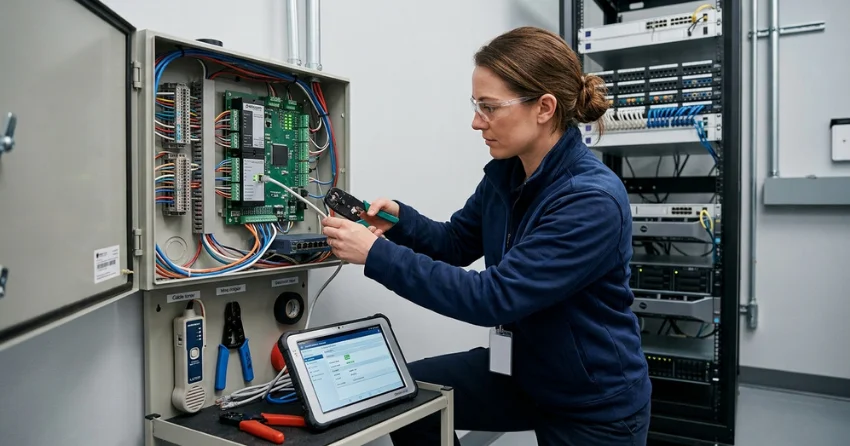
A standard single-site reporting configuration typically takes 1 to 3 days, covering event filtering rules, retention settings, report templates, and role-based access permissions. Properties throughout Barrie with complex compliance requirements or multiple integrated systems can extend to a week or more, particularly when custom report templates need to match specific regulatory formats.
Most of the actual time for projects across Barrie goes into understanding what a business genuinely needs from its reports rather than the technical configuration itself, since the configuration work moves quickly once the actual requirements are clearly defined. Skipping that discovery step and jumping straight to generic settings is the most common reason a reporting setup needs significant rework within the first few months, once the gap between what was configured and what the business actually needed becomes apparent.
Reports often need to leave the access control platform entirely, whether that means handing a document to an insurance adjuster after an incident, providing records to an auditor, or sharing a specific timeframe with law enforcement during an investigation. Configuring export formats correctly as part of Access Event Reporting Setup Barrie, including which fields appear and how the data is formatted, saves significant time compared to manually reformatting a raw export every time an external request comes in.
We set up export templates for the most common external sharing scenarios a business across Barrie is likely to encounter, so producing a clean, professional report for an outside party takes minutes rather than requiring someone to manually clean up spreadsheet data under time pressure. Getting this right at setup means the report is ready the moment it is actually needed, not assembled from scratch during an already stressful situation.
A handful of the same gaps show up repeatedly when we assess an existing Access Event Reporting Setup Barrie for the first time, regardless of the platform involved. Retention periods left at the manufacturer's default rather than matched to actual compliance needs, no saved templates for the questions a business asks most often, and alert thresholds nobody has touched since installation are the three most common findings.
None of these gaps are visible during day-to-day use for buildings throughout Barrie, since the system still logs events and technically produces reports either way. They only become apparent the moment someone actually needs a fast, specific answer and discovers the reporting tools were never configured to deliver one. We flag these gaps clearly during an assessment rather than assuming a client will notice them on their own, since most businesses genuinely do not know what a properly configured system should be capable of until they see the difference directly.
Typical costs for Access Event Reporting Setup Barrie range from $300 to $1,200 per site depending on the complexity of event filtering rules, the number of custom report templates needed, and whether integration with other security systems is included. A single-site setup with standard templates sits toward the lower end, while a multi-system integration with custom compliance reporting sits higher. Simply contact us or call (289) 672-2825 to get a quote specific to your building, and expect a clear scope based on your actual reporting needs rather than a generic package.
Every quote reflects the specific reporting requirements identified during our discovery conversation, since a property with straightforward needs costs meaningfully less to configure than one with complex compliance obligations across multiple systems and departments.
Electrical Services Ontario is fully licensed and insured, and every Access Event Reporting Setup Barrie project is backed by a satisfaction guarantee on report accuracy and usability. Our technicians know which platforms support which reporting features natively and which require creative configuration work to achieve a specific compliance or operational requirement for the business.
We test every configured report and alert before considering a project complete, confirming the data returned actually matches what the business needs rather than assuming the setup works correctly once the settings are saved. That verification step is why property managers across Barrie trust our reporting configurations to hold up when an actual audit or investigation puts them to the test. Discovering a gap in the report only after it was too late for that gap to matter less is the exact outcome we test to prevent.
A reporting system that technically logs everything but answers nothing quickly is not actually doing its job, regardless of how much raw data sits in the database. Electrical Services Ontario configures Access Event Reporting Setup Barrie projects around what a business genuinely needs to find quickly, not just what the platform happens to log by default. Most existing installations never bother to close that exact gap.
Property managers throughout Barrie who have never had their reporting layer properly configured are often surprised how much faster and more useful the whole system becomes once someone actually sets it up with real, specific questions in mind. Simply contact us or call (289) 672-2825 and our team will walk through your current reporting gaps to scope exactly what a proper setup would involve for your building.
Every service call starts with a unique situation. Here are the common issues customers contact us about and how our team handles them.

Tell us what is happening — no power, a breaker that will not reset, or a planned upgrade. We talk it through and book a time that works for you, including same-day for urgent calls.
A licensed electrician looks at the actual panel, circuit, and load rather than quoting over the phone, then gives you a firm written price with the scope set out line by line.
The electrician who quoted the job does the work. Drop sheets go down, permits are filed where the work calls for it, and you get an update before anything changes from the plan.
Every circuit is tested before we close the panel, the inspection is booked and the certificate handed over, and our labour is warrantied for two years.
Reach out to Electrical Services Ontario for panel upgrades, rewiring, EV chargers, generators, or emergency electrical repairs across Barrie.
Call, or send a message through the form below, either way an electrician gets back to you rather than a call centre.
CALL US (289) 672-2825 EMAIL US Click to send a messageYour message stays between us.

